Export the file your device recorded, and open it in How It Went.
Exporting happens on the Garmin Connect website, not in the Garmin Connect app. The app has no export at all — its Share button offers a picture or a link, and neither is a file. Everything below happens at connect.garmin.com, in a browser, and it works on a phone as well as on a computer once you get past the one thing in the way.
Garmin will hand you a ride five ways. One of them is the file your device wrote. The other four are conversions, and each one leaves something behind.
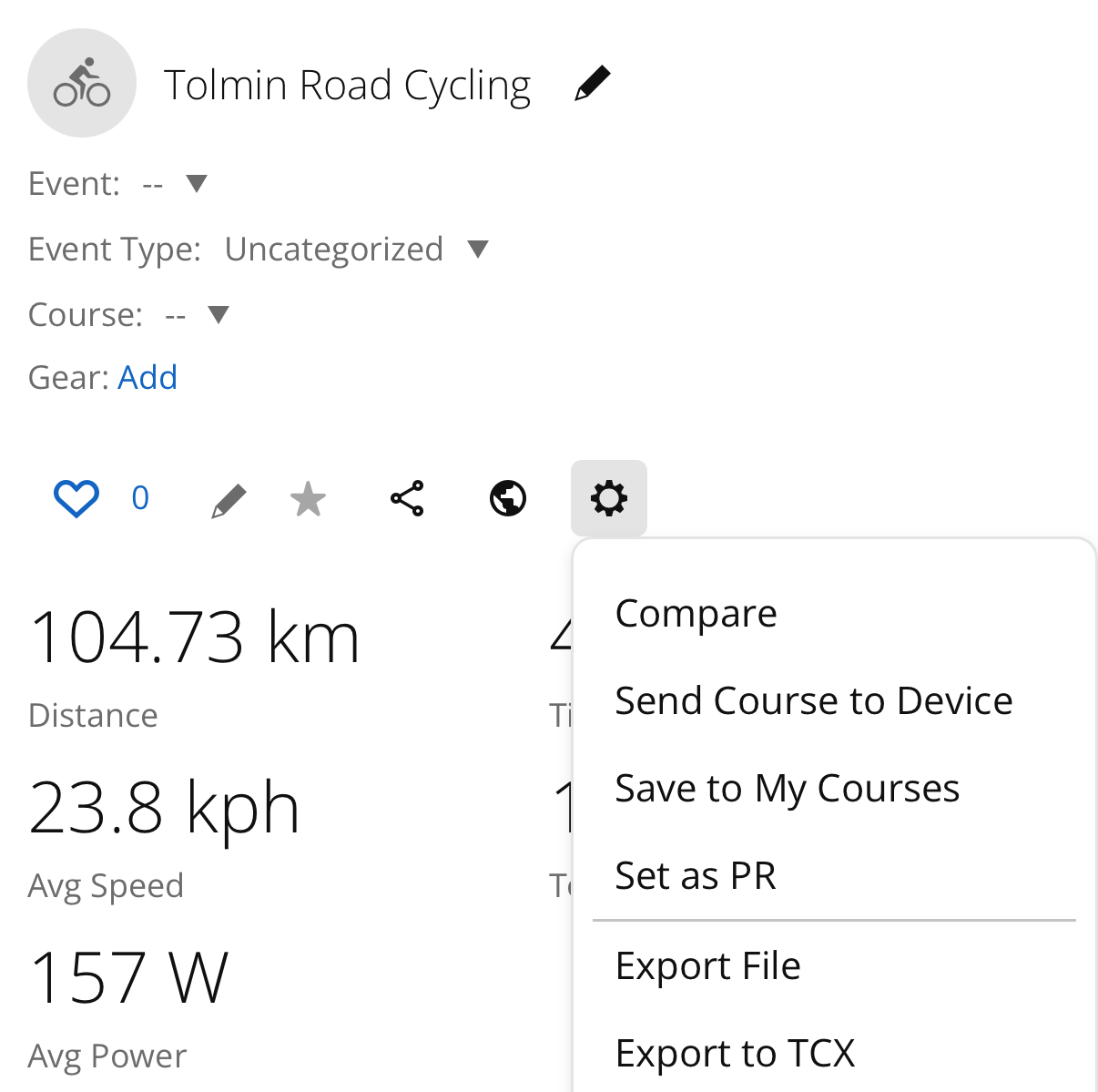
The download starts on that click. What lands is a zip named after the
activity — 23778275240.zip — holding one file,
23778275240_ACTIVITY.fit. Send the zip to How It Went as it is. There is
nothing to unpack.
Export File is what it is called now, and it was Export Original for years. Older guides still say Original, ours included until this page was written. If you are looking for a menu entry with that name, it is the one above Export to TCX.
The same five steps work, and the screenshot above was taken on a phone. One thing gets in the way first.
The link will try to bounce you into the Garmin Connect app, which is the one place that cannot export. Tap anything pointing at connect.garmin.com with the app installed and the app opens instead of the browser. Two ways past it:
Once you are on the website, the gear is where the screenshot shows it and the zip goes wherever your browser puts downloads.
If your gear menu has no Export File in it, ask for the desktop site. Older guides treat this as a required step and it no longer is — but layouts vary, and this is the thing to try if yours does not match the screenshot.
If a whole season is easier than a ride at a time, Garmin will mail you an archive of everything instead: Account Settings, then Export Your Data, then Request Data Export. The link usually arrives within 48 hours and can take up to 30 days, so it is not the way to get one trip in front of you tonight.
Same ride, two downloads:
| Export File | Export to GPX | |
|---|---|---|
| Position, elevation, time | yes | yes |
| Heart rate, cadence, power, temperature | yes | yes |
| The totals your device showed you | yes | no |
| Laps, and where the ride was paused | yes | no |
| Shifting, tire pressure, anything else the bike sent | yes | no |
The bottom three rows are why the longer route is worth it.
Total ascent is the row you would have noticed. It is a filter choice rather than a measurement, which is why your head unit, Garmin Connect and Strava can report three figures for one ride and none of them be wrong. The zip carries your device’s own number. A GPX has nowhere to put it, so a film made from one shows a figure computed here — close, usually within a few meters, and not the number you read at the top of the pass.
A GPX has no lap and no pause. The format is a list of points with a few channels hung off each one, and the shape of the day is not in it. An hour at lunch and an hour going slowly look the same.
What the bike sent is in the FIT and nowhere else. There is no GPX field for an electronic shift or a tire pressure reading, so no exporter can write one.
How It Went reads a GPX perfectly well, and for a service that offers nothing better a GPX is the right answer. What it cannot do is put back what the conversion dropped.
Rides is the first step of a trip. It says Start with your rides, with Choose files under it.
Take every day of the trip at once rather than one at a time. The days come out of the timestamps, so a week of rides arrives as a week.
A trip can mix all three: a zip for the days you rode with the Garmin, a bare
.fit, and a .gpx from whatever recorded the rest.
Checked on September 14, 2026, against: